

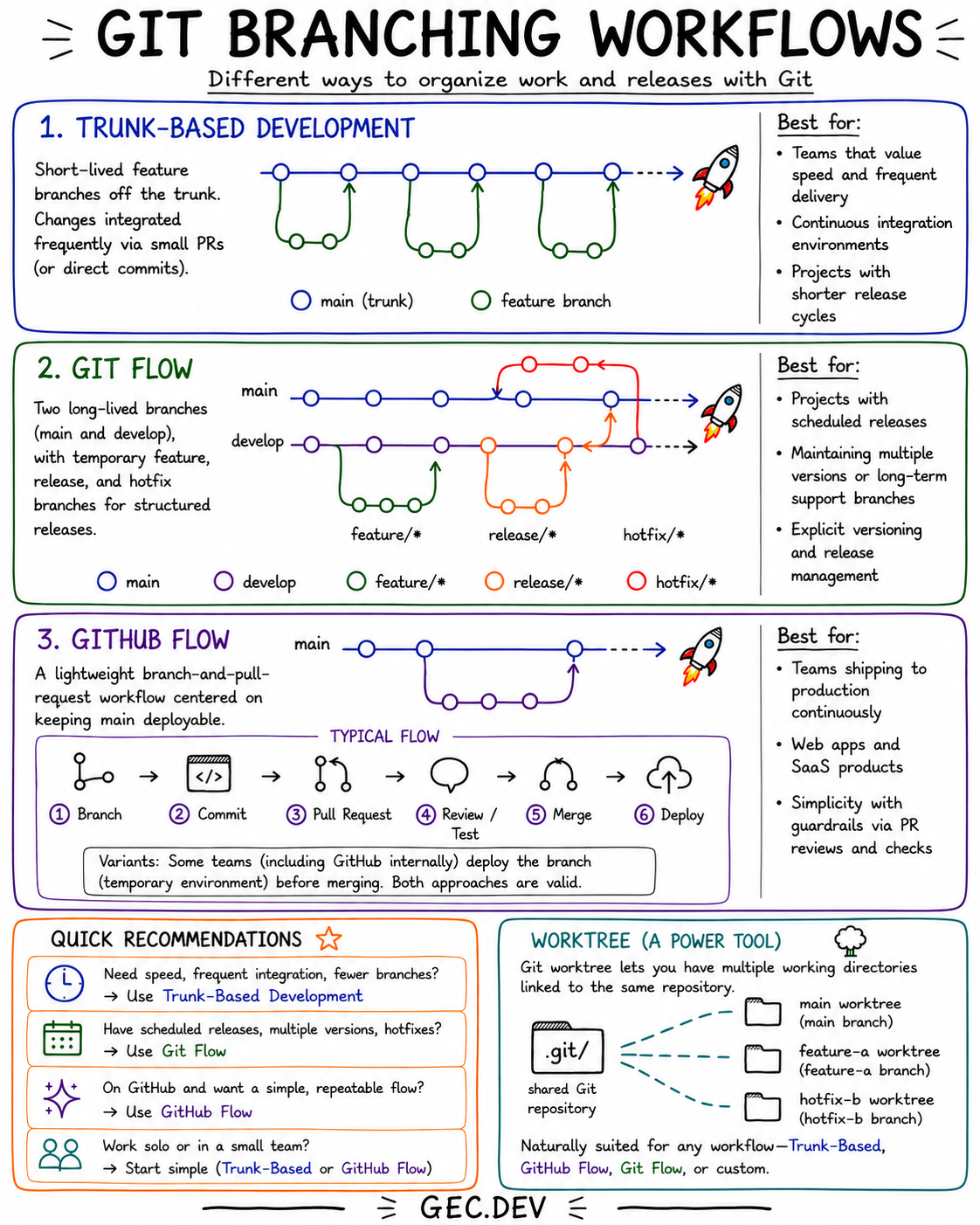
Git branching workflows define how a team separates unfinished work, integrates changes, and prepares releases. The infographic compares three common approaches: trunk-based development, Git Flow, and GitHub Flow. It also shows how Git worktrees can support any of them without changing the underlying workflow.
The right choice depends less on the size of the repository than on how frequently the team integrates and releases code.
The workflows at a glance
| Workflow | Long-lived branches | Integration style | Best fit |
|---|---|---|---|
| Trunk-based development | One trunk | Very frequent, with small changes | Continuous integration and short release cycles |
| Git Flow | main and develop |
Structured feature, release, and hotfix branches | Scheduled releases and maintained versions |
| GitHub Flow | One deployable main branch |
Short-lived branches merged through pull requests | Continuous delivery for web apps and services |
These are starting patterns rather than rigid rules. A team can adapt branch names, review requirements, deployment timing, and release automation while preserving the main idea of a workflow.
Trunk-based development
Trunk-based development keeps one primary branch, usually main, as the shared integration point. Developers make small changes on short-lived feature branches or commit directly to the trunk when team controls permit it.
gitGraph
    commit
    branch feature-a
    checkout feature-a
    commit
    checkout main
    merge feature-a
    branch feature-b
    checkout feature-b
    commit
    commit
    checkout main
    merge feature-b
The defining property is not the absence of branches. It is that branches live briefly and changes return to the trunk frequently. Small pull requests, automated tests, and feature flags help keep main releasable while incomplete product behavior remains hidden.
This workflow is a strong fit when a team values:
- Fast feedback from continuous integration.
- Frequent delivery.
- Small batches of work.
- Fewer long-running merges.
Trunk-based development becomes difficult when changes remain isolated for days or weeks. At that point, the team has feature branches in name and a delayed-integration workflow in practice.
Git Flow
Git Flow uses two long-lived branches: main for released code and develop for integrated upcoming work. Temporary branches give each kind of change an explicit path:
feature/*branches start from and return todevelop.release/*branches stabilize a planned release before it reachesmain.hotfix/*branches start from released code and carry urgent fixes back to the relevant long-lived branches.
This structure can make release state and version maintenance explicit. It suits products with scheduled release trains, multiple supported versions, or a formal stabilization phase.
The cost is more branch coordination. Teams need clear rules for where branches begin, where they merge, and how fixes propagate. For a service that deploys every merged change, those extra paths often add ceremony without adding useful control.
GitHub Flow
GitHub Flow is a lightweight branch-and-pull-request workflow centered on keeping main deployable:
- Create a branch from
main. - Commit the change.
- Open a pull request.
- Review and test it.
- Merge it into
main. - Deploy the result.
Some teams deploy the branch to a temporary environment before merging. Others merge first and deploy from main. Both variants preserve the important constraints: branches are short-lived, pull requests are the collaboration boundary, and the primary branch stays ready for production.
GitHub Flow works particularly well for web applications and SaaS products that ship continuously. Required reviews, status checks, and branch protection provide guardrails without introducing dedicated release branches.
Choosing a workflow
Start with the release model:
- Choose trunk-based development for the shortest integration loop and the fewest branches.
- Choose Git Flow when scheduled releases, stabilization periods, or multiple maintained versions require explicit branch roles.
- Choose GitHub Flow when pull requests lead directly toward continuous production deployment.
For solo work or a small team, start with trunk-based development or GitHub Flow. Add branch types only when a concrete release or support requirement makes them necessary.
Worktrees are a power tool, not another workflow
git worktree creates multiple working directories linked to one Git repository. Each worktree can check out a different branch, so a developer can keep main open in one directory while working on a feature or hotfix in another.
git worktree add ../project-feature feature-a
git worktree add ../project-hotfix hotfix-b
git worktree list
Worktrees avoid repeatedly stashing changes or switching one directory between unrelated tasks. They are useful with trunk-based development, Git Flow, GitHub Flow, or a custom branching model because they change the local working setup, not the team's integration policy.
Use the simplest workflow that matches how the product is released. Branches should make integration and delivery clearer; when they only preserve work for longer, they increase the distance between a change and the feedback that makes it safe.
Comments
0 total